Monthly Archives: July 2022

It Depends

Many, many years ago, I started a blog. It was mostly so I could write some bits of code and findings down because I have a memory like a gold fish and I figured having a record of some of the issues I encountered, and the ways they were overcome might be useful. I thought maybe it was worth sharing this with the world rather than keeping it to myself too, because you know….the SQL community is awesome about telling me the answers to my questions, and if jotting down a few things helps someone else out there solve the problem they are baffled by then…mission accomplished. Because I was a junior DBA when I started my blog, and because I had a habit of asking questions looking for a black and white answer and never received it, I also called my blog “It Depends”.

Many many years later Debra Melkin happened to choose “It Depends” as the title for her TSQL Tuesday blog invitation, and while I was a couple of weeks late to the party, I thought it was a good chance to revisit what is all to often a standard response to any question in the DBA world.

So way back in 2011 Paul Randal wrote a post that stated something along the lines of “The answer to every question in SQL consulting is ‘It Depends’, unless the question is ‘should I enable autoshrink?’ in which case the answer is ‘no‘.” What is so powerful about that post (and to be honest the SQLSkills approach to consulting in general) is that they don’t use “it depends” as a conversation ender – it’s a conversation starter. It turns a question searching for a black and white answer into a list of more targetted questions to find out what the right answer is for you, and for your particular base.

Despite actually naming my blog “It Depends” I try hard not to use the phrase itself, but I do find myself answering questions that could be answered with “It Depends” with 4-5 questions which allow me to give a targeted answer that fits the clients specific environment and acknowledges the business drivers rather than focusing on the specific technical answers to questions.

And with this in mind I (finally) get to my response to Debra’s invitation. She asks specifically about times someone asks a question about SQL which started off with an “It depends” redefinition of the question to find out what the thing they are actually asking about or trying to achieve is, and leads into a rant that may or may not be related. So here’s my rant.

“Your technical skills are not the point.”

This is both my biggest realization and biggest disappointment in my technical career. I think all people who reach the highest level in technical roles have to cross this bridge at some point. In general we cross the bridge with regret and more than a little reluctance, but the sooner we can cross it and get on with our career growth the better. You see for the first part of your career there is a massive wall of technical knowledge that we find ourselves battering against, constantly trying to get technically more and more proficient. But at some point, either independently or because someone higher up the food chain kindly takes us aside and explains it to us, we come to a realization that being technically brilliant is far less important than working our what it is that the business is trying to achieve.

Let’s use a question about availability groups as an example. “Would this work with availability groups?” is the type of question I see asked from time to time. The technical answer can be “yes” or “no” and too often that’s the answer I see given by junior technical people. And they are right, but the problem is they’ve answered the question presented to them instead of working out what question they should have been asked. Why are you asking me about availability groups? Do you want to report off this? Do you want it to be highly available? What is it that you actually want to achieve?

I see business people frustrated with IT slowing them down instead of empowering them. I see technical people frustrated with Salespeople selling things that can’t exist because there are technical limitations and I see developers cobbling together a solution that meets an immediate requirement but then hamstrings the performance of key business systems for years to come. And the reason for all these problems is usually the same. A business question is asked as a technical question, and the technical answer is misinterpreted as a business answer. In other words, people are speaking the language of their role, and no-one is translating.

That is why when you ask a junior if you can do something they will often say “Sure” and they’ll make a change and suddenly you can do the thing you wanted, but when you ask a more senior person the same thing you get met with a seeming wall of questions back.

IT systems are complex, and throwing one switch can often have a string of unexpected consequences. That’s why the more senior a person the more questions you’ll likely get asked before they take any action taken. But business systems can be even more complicated, and technical people need to be aware that ultimately they will not be judged on how perfectly a system is set up, but on how perfectly it meets business requirements and expectations.

I wish it wasn’t so. I wish when a business person asks me something they understood the technologies they were talking about and asked a correctly structured technical question. But the reality is that being the ‘translator’ is often the most critical role that can filled in any project. Getting the tech people to understand the business need and the business people to understand the technical possibilities is a skill that is both rare, and in the end very lucrative. Even if we wish it wasn’t so.
The Dangers of Incorrectly Set Default Database

I struck an interesting problem this week when migrating a database. Apparently the database was my users default, which immediately kicked me out of the server and prevented me logging back in. This is the story of how it happened and the steps I needed to take in order to resolve it.

It wasn’t a dark and stormy night, but considering what was about to go down it probably should have been. Typical weather really.

I was migrating the final database off and old SQL 2012 server. It was the final database on this server which we began migrating databases off over 18 months ago, so I was pleased to see it go. The database itself was tiny, so my part of the migration was just to perform a backup restore migration to the new server. The full backup ran fine in a couple of seconds, but when I ran the tail-log backup it completed and I immediately got disconnected.

I thought that was odd, but proceeded with the restore on the new server which went fine. We were using a CNAME redirect to catch any connection strings we didn’t know about, so the old server was renamed as part of the process. I asked the server engineer to hold off his rename and CNAME steps while I investigated the disconnect.

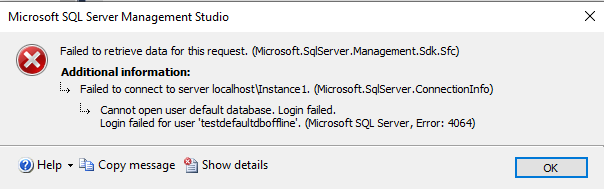
I quickly found I couldn’t log in with either my own account or the service account our application connects to SQL. Both received the same error.

Cannot open user default database. Login Failed. Login failed for user ‘xx’.

You shall not pass.

So, we have provided support for this client for a while, but the server predates our companies support contract. However what it looked like to me was the group containing our logins had it’s default database set to the database I’d just taken offline. Annoying, but not insurmountable. I asked one of the client testers I knew had security permissions on the server to log in and flip our groups default database back to master. But she got the same error.

Things were suddenly looking dark. I quickly completed the migration steps on the target server and we did the server rename and CNAME switch to the testers could test the successful migration, but what should have been me sitting quietly for an hour while they completed testing quickly became a mad flurry of trying everything to get access into the old server should we require a rollback. Now I wasn’t too concerned, we did have a snapshot taken prior to the change that was our sledgehammer rollback, but I didn’t know what was going on and wanted to understand.

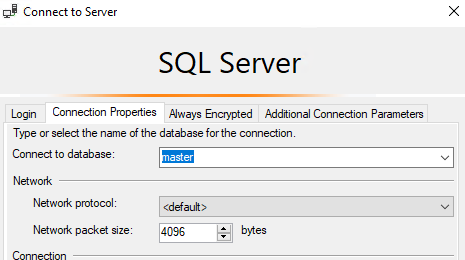
There was a simple fix I should have done at this point, which is just to change the database to master in my connection string. When I did that it failed. I don’t know why, and haven’t been able to recreate that failure, which leads me to think that when I changed the database it didn’t ‘stick’ and I only tried it once, assumed it failed and moved on to find another solution. A lot of time should have been saved here by doing that correctly. For the record that is on the options->connection properties screen in SSMS. All you need to do is type in ‘master’ as per below:

THE SOLUTION – The “Connect to database” will usually show ‘<default>’ – and ‘<Browse Server>’ will fail because you can’t login to your default database to get a database list. Manually typing in ‘master’ will save the day.

That should allow you to log in and update the default database of users who can’t log in. It also shows why trying the same thing twice is sometimes NOT the definition of insanity, because you may have done it wrong the first time, particularly if you are restoring databases in the other window.

At any rate – assuming the direct connect with the correct default database was still failing we tried and failed the following steps:

  1. Access the server via “sa” – only to find the “sa” password was not recorded in the client password vault.
  2. Access the server via various other Windows accounts – All failed with the same default database error.
  3. Access the server via other SQL accounts – These succeeded but none had the credentials to add much to the troubleshooting or remediation.
  4. Force admin access via single user restart – This also failed with the default database issue.
  5. Force sysadmin access via DBATools. This is a really cool feature of DBATools, but in this case failed with an error that didn’t provide much context on the problem(I suspect it was the same default database login failure causing the issue).

So what we knew at this point was that all windows logins failed, while all SQL logins succeeded. I was beginning to suspect I knew the nature of what had happened. Some account that windows logins were a member of had been added with the default database set to the one I had just dropped. But how to prove it? And how to fix it?

I took the following steps:

  1. Create a local windows user.
  2. Add that user to the servers local administrator group
  3. Restart SQL in single user mode with access limited to SQLCMD connections
  4. Run my SQLCMD script to create a SQL login in the context of the new local windows account
  5. Let out a huge sign of relief when that worked.
  6. Restart the server in multi user
  7. Log in with my shiny new SQL sysadmin account and start the troubleshooting.

Once I had sysadmin access back troubleshooting took only a few seconds. Sure enough the DOMAIN\USERS account had been added to the server. It had no specific rights on anything but had the default database set to the database we’d just taken offline. I flicked that across to “master” and everyone was immediately able to log back in again.

All of this took around 1/2 hour to work through, and ultimately didn’t have any impact on the migration except for a couple of minutes delay before I handed the database over for the rename. I was able to do my troubleshooting in parallel with the application testing, so ‘no harm, no foul’ right? Well, yes. But it could have been so much worse if this wasn’t the last database we shifted off the server. This was an incredibly dangerous setting. If we had moved this database first instead of last the simple act of taking it offline would have taken every other application on the server offline.

Hopefully, if you find yourself in the same situation the information in this post will save you some time both diagnosing and resolving the problem. I’ve definitely added checks for Domain\Users accounts into my pre-migration checks, and while I don’t ever expect to see this scenario again, if I do it’s nice to know the fix is 10 seconds and 2 clicks away on the login screen.

  1. Be aware of the Domain Users group when making changes in a production environment.
  2. When troubleshooting – keep notes of all the bits you tried – because you may make a solution way more complicated than it actually needs to be